

CrowdSec: Versatile Open-Source Security for Every Layer

Why CrowdSec?
CrowdSec is an open-source, collaborative security engine that turns your existing log streams into a smart defense layer. It detects brute-force attempts, port scans, web exploits, bot traffic, and other abusive behavior by analyzing logs in real time, then produces decisions (e.g. “ban this IP”) that bouncers enforce at your edge firewalls, reverse proxies, or gateways.
What makes it versatile is that it doesn’t lock you into one stack. You can run the engine in Docker on a small VPS, natively on an Ubuntu server, or even on the firewall itself (e.g. pfSense). Bouncers can live on Ubiquiti gateways, pfSense, Traefik, Nginx, or as a host firewall (nftables/iptables). One detection engine can feed many bouncers, and the CrowdSec Hub gives you parsers, scenarios, and remediation components for almost any log source you already have.
This post walks through what CrowdSec is, how to run it (Docker and Ubuntu), and how to use bouncers on Ubiquiti and pfSense so you can place protection exactly where it fits your network.
How CrowdSec Works
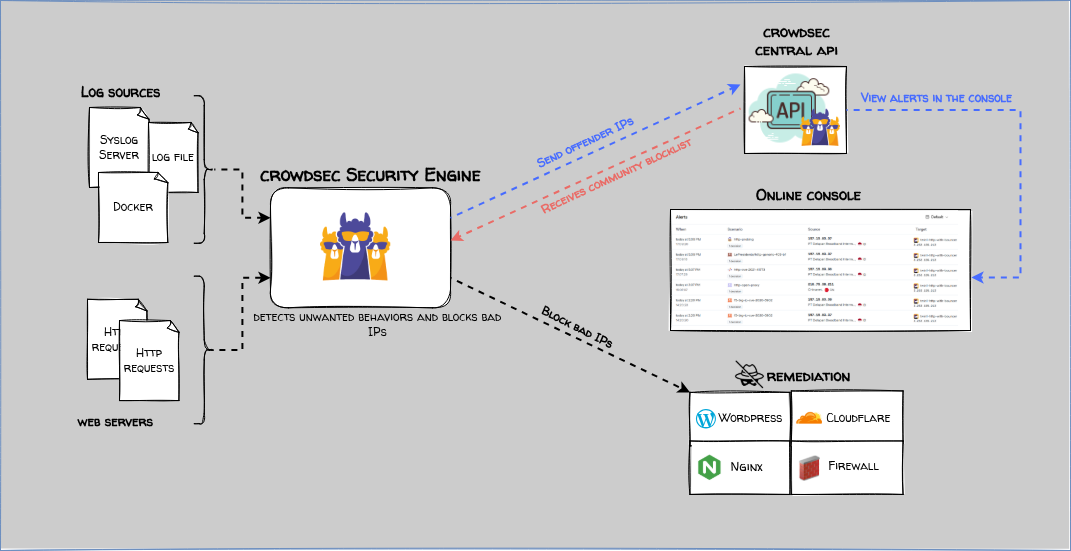
CrowdSec has a few core concepts:
| Concept | Role |
|---|---|
| Security engine | Reads logs, runs parsers and scenarios, maintains a local database of decisions. |
| Parsers | Turn raw log lines into structured events (e.g. HTTP access, SSH auth, firewall).Log Parsers can be found here. |
| Scenarios | YAML rules that define “this pattern of events = attack” and produce a decision (ban, etc.). |
| Collections | Bundles of parsers + scenarios (e.g. crowdsecurity/nginx, crowdsecurity/linux). |
| Bouncers | Remediation components that talk to the engine’s Local API (LAPI) and apply bans (block IP on firewall, deny in reverse proxy, etc.).Bouncers can be found here. |
| Hub | CrowdSec’s repository of parsers, scenarios, postoverflows, and bouncers. |
Flow in short: logs → engine (parsers + scenarios) → decisions → LAPI → bouncers → enforcement.
You install the engine once (or per node), point it at your logs, install the right collections, then attach one or more bouncers. Optionally, you can share and consume blocklists from the CrowdSec community.
Setup Option 1: Docker
Running CrowdSec in Docker is convenient when the rest of your stack is already containerized (e.g. Traefik, Nginx, other apps). The engine has a few requirements:
Persistent config
Use a volume for /etc/crowdsec/ so you can keep acquis.yaml and other config across restarts.
Persistent data
Persist /var/lib/crowdsec/data/; the engine requires it (since 1.7.0) and may refuse to start without it.
Access to log sources
Mount the log paths (or shared volumes) read-only so the container can read them.
Quick run (testing)
docker run -d \
  --name crowdsec \
  --volume /etc/crowdsec:/etc/crowdsec \
  --volume /var/lib/crowdsec/data/:/var/lib/crowdsec/data/ \
  --volume /var/log:/var/log:ro \
  --env COLLECTIONS="crowdsecurity/linux" \
  -p 127.0.0.1:8080:8080 \
  crowdsecurity/crowdsec:latest
This uses the host’s /var/log and the crowdsecurity/linux collection. For production, use a dedicated config dir and only mount the logs you need.
Docker Compose (production-style)
Use Compose to wire CrowdSec to your reverse proxy or app logs via a shared log volume.
services:
  crowdsec:
    image: crowdsecurity/crowdsec:latest
    restart: always
    environment:
      COLLECTIONS: "crowdsecurity/nginx crowdsecurity/base-http-scenarios"
      TZ: "Europe/Oslo"
    ports:
      - "127.0.0.1:8080:8080"
    volumes:
      - crowdsec-config:/etc/crowdsec/
      - crowdsec-db:/var/lib/crowdsec/data/
      - ./crowdsec/acquis.yaml:/etc/crowdsec/acquis.yaml:ro
      - proxy-logs:/var/log/nginx:ro

volumes:
  crowdsec-config:
  crowdsec-db:
  proxy-logs:
Create ./crowdsec/acquis.yaml so the engine knows which files to read:
filenames:
  - /var/log/nginx/access.log
type: leaky
labels:
  type: nginx
If you use Traefik instead of Nginx, install the Traefik collection and point filenames at your Traefik access log path (e.g. /var/log/traefik/access.log), with labels.type: traefik.
After the first run, install extra collections inside the container if needed:
docker exec -it <crowdsec_container> cscli hub update
docker exec -it <crowdsec_container> cscli collections install crowdsecurity/base-http-scenarios
LAPI is exposed on port 8080; bouncers (on the same host or on gateways) will use this URL and an API key to fetch decisions.
Setup Option 2: Ubuntu (native)
On an Ubuntu server 24.04, you can install CrowdSec directly. This fits single-server setups or when CrowdSec runs on the same machine as the apps producing the logs.
Install the engine
sudo apt update && sudo apt upgrade -y
sudo timedatectl set-ntp true
curl -s https://install.crowdsec.net | sudo sh
sudo apt install -y crowdsec
sudo systemctl enable --now crowdsec
Time sync is important; CrowdSec relies on it for log parsing.
Hub and collections
sudo cscli hub update
sudo cscli collections install crowdsecurity/linux
sudo cscli collections install crowdsecurity/nginx
sudo cscli collections install crowdsecurity/base-http-scenarios
Adjust collections to what you use (e.g. crowdsecurity/traefik instead of nginx if you run Traefik).
Configure log acquisition
Edit /etc/crowdsec/acquis.yaml and add your log sources. One block per log type; use the label that matches your parsers (e.g. nginx, traefik, syslog):
# SSH / auth (for crowdsecurity/linux)
filenames:
  - /var/log/auth.log
type: leaky
labels:
  type: syslog
---
# Nginx (for crowdsecurity/nginx)
filenames:
  - /var/log/nginx/access.log
type: leaky
labels:
  type: nginx
Then:
sudo systemctl restart crowdsec
sudo cscli metrics
Use cscli metrics and sudo tail -f /path/to/log | sudo crowdsec -t to confirm that logs are parsed.
Optional: firewall bouncer on the same host (nftables)
To enforce bans at the kernel firewall on this Ubuntu host:
sudo apt install -y crowdsec-firewall-bouncer-nftables
sudo systemctl enable --now crowdsec-firewall-bouncer
Create a bouncer token and configure the bouncer to use LAPI (usually http://127.0.0.1:8080) and this key; see CrowdSec docs for the exact config file path and format for your release.
Bouncer 1: Ubiquiti (UniFi) Gateway
UniFi gateways don’t ship a built-in CrowdSec bouncer. You can still enforce CrowdSec decisions at the gateway using the community cs-unifi-bouncer (e.g. Teifun2/cs-unifi-bouncer). It talks to your CrowdSec LAPI and applies bans by adding block rules (or equivalent) on the UniFi device.
LAPI reachability
CrowdSec LAPI must be reachable from the UniFi gateway (or from a host that runs the bouncer and can push rules to UniFi). If CrowdSec runs in Docker or on a server, ensure the gateway or that host can reach http://<crowdsec-host>:8080.
Create a bouncer key
On the CrowdSec engine run sudo cscli bouncers add unifi-gateway and save the printed API key.
Install and configure cs-unifi-bouncer
Follow the project’s README: set the LAPI URL, the bouncer key, and any UniFi-specific options (e.g. controller URL, credentials if the bouncer manages the gateway via API).
Run the bouncer
Run the bouncer as a service or in a container so it periodically pulls decisions from LAPI and updates the UniFi gateway.
Because the UniFi bouncer is community-maintained, check the GitHub repo and CrowdSec Hub for the exact install method (binary, Docker, or script) and for any UniFi firmware-specific notes.
Bouncer 2: pfSense
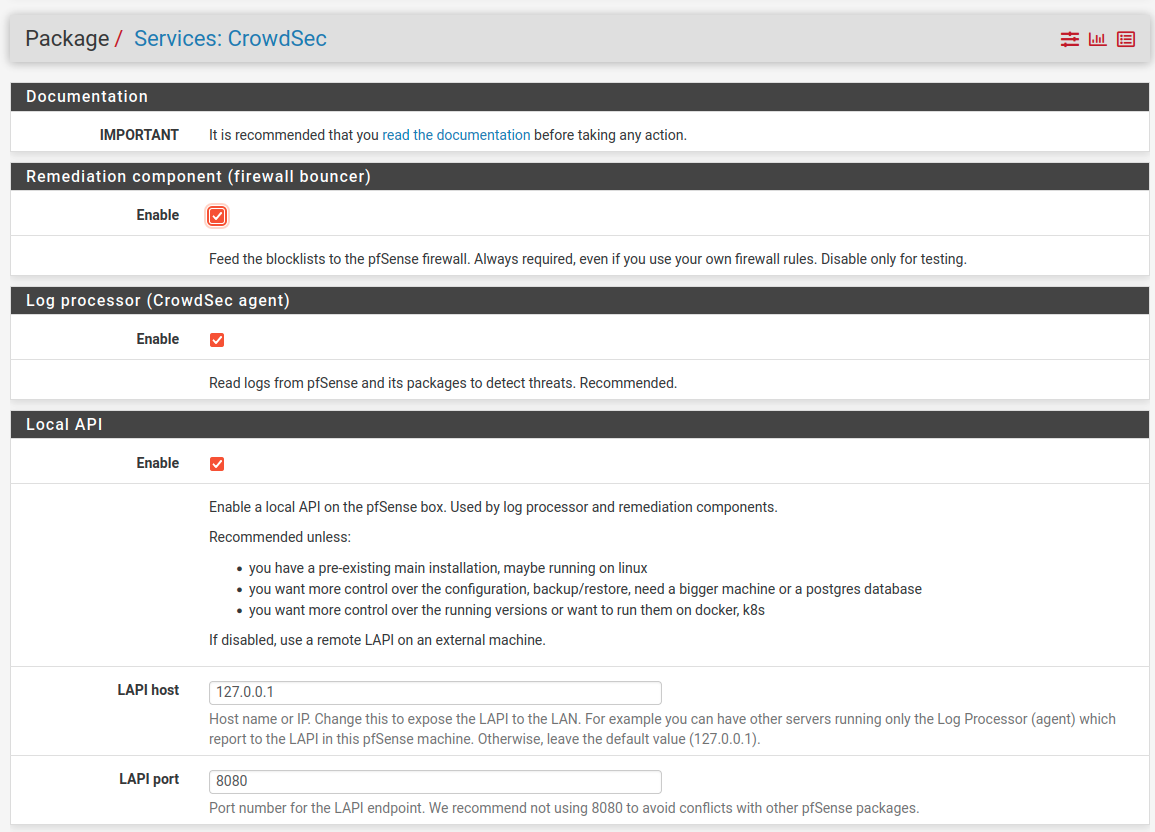
CrowdSec supports pfSense with an official pfSense package that can run in several modes:
Remediation only (small)
pfSense only runs a bouncer and receives blocklists from a remote CrowdSec engine (your Docker or Ubuntu instance). No log processing on the firewall.
Medium
Bouncer plus log processing on pfSense to detect attacks targeting the firewall itself.
Large (fully autonomous)
Engine, LAPI, and bouncer all on pfSense; the firewall ingests its own logs and produces and enforces decisions locally.
Install on pfSense
SSH into the pfSense box and run:
fetch https://raw.githubusercontent.com/crowdsecurity/pfSense-pkg-crowdsec/refs/heads/main/install-crowdsec.sh
sh install-crowdsec.sh
Do not manually start/stop CrowdSec services; the package integrates with pfSense’s service management. Alternatively, install from the releases page using pkg add -f if needed (e.g. with IGNORE_OSVERSION for version mismatches).
Configure in the web UI
Go to Services → CrowdSec. The default is often “Large” (full engine + LAPI + bouncer). You can switch to “Small” and point the bouncer at your existing CrowdSec LAPI (Docker or Ubuntu) so one central engine protects multiple edges, including pfSense.
Config backup
CrowdSec config on pfSense is not included in the standard pfSense backup; back it up separately if you rely on it.
Major upgrades
Major pfSense upgrades may require reinstalling or reconfiguring the CrowdSec package.
RAM-backed /var
If you use the Local API on pfSense, avoid using a RAM-backed /var so the database survives reboots.
Collections and Versatility
CrowdSec’s strength is the Hub: ready-made parsers and scenarios for SSH, Nginx, Apache, Traefik, Postfix, Suricata, and many more. You can mix and match:
SSH
Use crowdsecurity/linux, which often includes SSH brute-force scenarios.
Web
Use crowdsecurity/nginx, crowdsecurity/traefik, crowdsecurity/base-http-scenarios, and AppSec-style collections for virtual patching.
Mail
Use crowdsecurity/postfix for mail-server logs.
IDS
Use crowdsecurity/suricata to feed Suricata events into CrowdSec.
Install only what you need and add acquisition entries for the corresponding log paths. The same engine can protect SSH, web, and mail from one place while multiple bouncers (UniFi, pfSense, Traefik, Nginx) enforce the same decisions at different layers.
CLI tool usage
The CrowdSec CLI (cscli) runs on the host where the engine is installed (or inside the CrowdSec container with docker exec). Use it to inspect and adjust decisions, manage bouncers, and check metrics.
Listing decisions
See active decisions (bans, captchas, etc.) that bouncers are enforcing:
sudo cscli decisions list
Filter by IP, scenario, or type:
sudo cscli decisions list -i 203.0.113.50
sudo cscli decisions list -s crowdsecurity/http-bad-user-agent
sudo cscli decisions list -t ban
Use --origin to see where a decision came from (e.g. crowdsec, cscli, CAPI) and --since 1h to limit to recent decisions.
Revoking (deleting) decisions
To unban an IP or remove a specific decision so bouncers stop enforcing it:
By IP:
sudo cscli decisions delete -i 203.0.113.50
By decision ID (from decisions list):
sudo cscli decisions delete --id 12345
By scenario (remove all decisions from one scenario):
sudo cscli decisions delete -s crowdsecurity/ssh-bf
All decisions (use with care):
sudo cscli decisions delete --all
After revoking, bouncers will pick up the change on their next LAPI poll and stop blocking that IP.
Adding manual decisions
You can add a ban (or other decision) yourself, for example to block an IP before a scenario would trigger:
sudo cscli decisions add -i 198.51.100.10 -d 24h -R "manual ban"
-i— IP to ban-d— duration (e.g.4h,24h,168hfor a week)-R— reason (shown indecisions list)-t ban— type (default isban; other types depend on bouncer support)
To ban a whole range:
sudo cscli decisions add -r 198.51.100.0/24 -d 1h -R "blocked range"
If the IP is in your allowlist, use --bypass-allowlist to add the decision anyway (use sparingly).
Bouncers
Run sudo cscli bouncers list to see registered bouncers and their last pull.
Metrics
Run sudo cscli metrics to inspect parsers, buckets, and decisions over time.
Simulation
Decisions can be created in simulation mode (no enforcement); use cscli decisions list --no-simu to see only “live” decisions.
Tips and Troubleshooting
Decisions but no blocks
Check that the bouncer can reach LAPI (URL and port) and that the API key is correct. On the engine: sudo cscli bouncers list and sudo cscli decisions list.
No parsing
Confirm acquis.yaml paths match where the logs actually are and that the service writing the logs has started. Test with sudo tail -f /path/to/log | sudo crowdsec -t.
Docker
Ensure /var/lib/crowdsec/data/ and /etc/crowdsec/ are persisted; otherwise the engine may refuse to start or lose state.
Backups
Back up /etc/crowdsec, and if you run CrowdSec on the host, /var/lib/crowdsec/data/. For pfSense, back up CrowdSec config separately.
Whitelists
Sometimes it can be nice to whitelist your own IP or whitelist traffic from a domain so you don’t lock yourself out. This can be done by following the Whitelist documentation
Summary
CrowdSec is a flexible, log-driven security layer that fits almost any environment: Docker, bare Ubuntu, or on the firewall itself. You choose where to run the engine and where to enforce Ubiquiti gateway, pfSense, Traefik, Nginx, or host firewall and you can combine several bouncers with one engine. With the Hub’s collections and community bouncers like cs-unifi-bouncer, you get a versatile, collaborative defense that adapts to your stack rather than the other way around.
Further reading
- CrowdSec official documentation installation, bouncers, and concepts.
- CrowdSec Hub parsers, scenarios, and remediation components.
- pfSense CrowdSec package install script and releases.
- Install guide crowdsec on pfsense detailed guide for pfsense.
- cs-unifi-bouncer (Teifun2) UniFi gateway bouncer; see the repo README for install and config details.