

Deej Sound Control for Linux written in Python
Deej Sound Control for Linux written in Python
An overly detailed, mildly unhinged, and very practical deep dive into a tiny Python service that lets hardware sliders steer your desktop audio like a studio console like Deej.
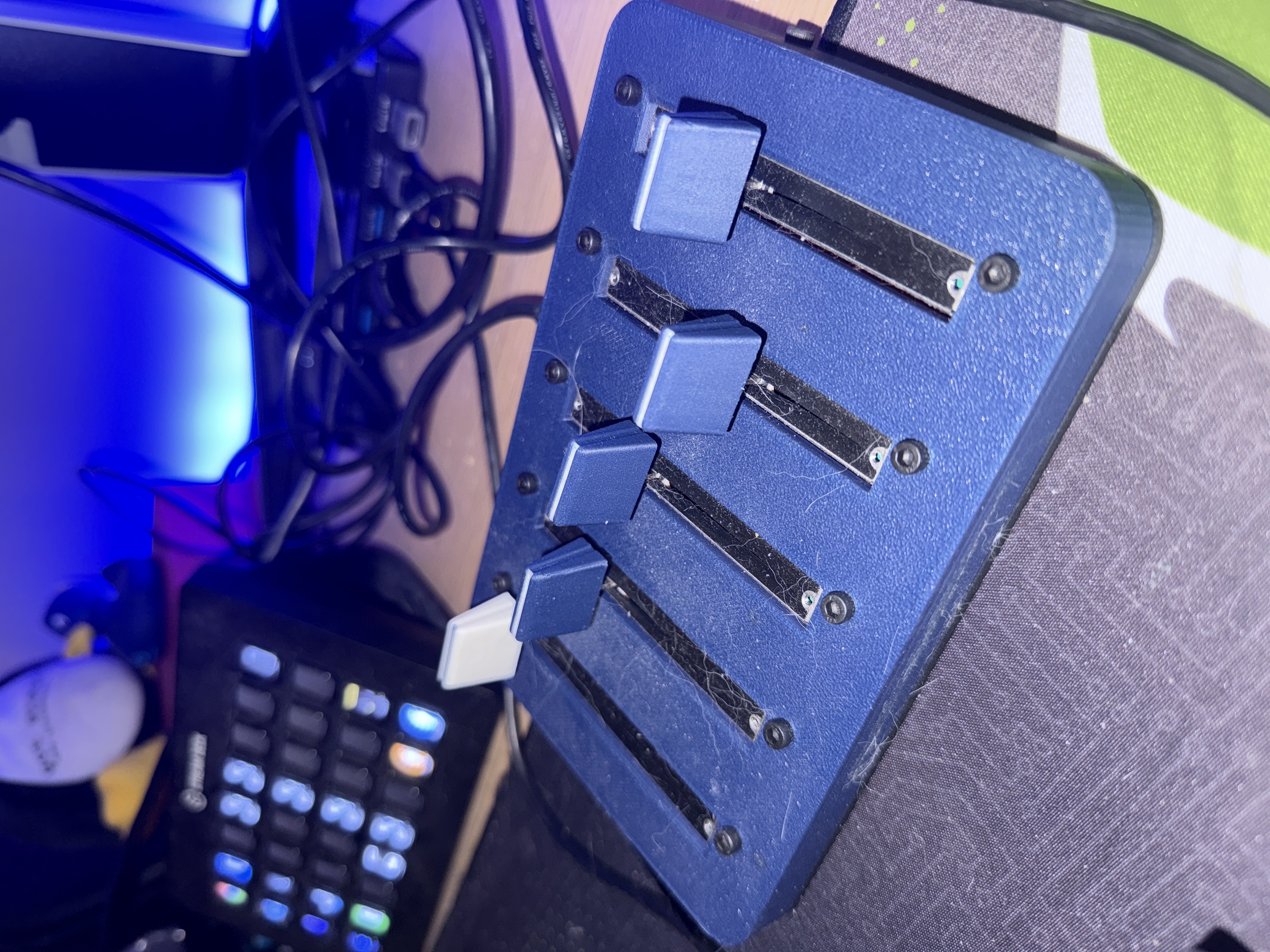
TLDR
You plug an ESP32 with five analog sliders into your Linux box. The ESP32 streams lines that look like 1023|1023|1023|1023|1023. A small asyncio script reads those lines over a serial port and turns them into volume levels for PulseAudio. Slider 0 is master volume. Sliders 1 through 4 are application groups such as your browser, Spotify, Discord, and Games. The script reconnects itself if the serial port drops. You can run it by hand or as a systemd service.
Why build this
- Because real knobs are better than clicking tiny icons
- Because Linux lets you wire up delightful pipelines with minimal fuss
- Because PulseAudio exposes a clean control surface
- Because this is a perfect excuse to play with asyncio and serial IO
High level flow
+-----------+        +-----------------+        +----------------+
|  ESP32    |  USB   |  Python asyncio |  API   |   PulseAudio   |
|  sliders  |=======>|  serial reader  |=======>|  sink inputs   |
+-----------+        +-----------------+        +----------------+
        |                    |                           |
        |  lines like        |  map to floats            |  per app volumes
        |  1023|...|1023     |  0.0 to 1.0               |  and master sink
Notes on the format
- The ESP32 sends a single line per update with five pipe separated integers in the range 0 through 1023
- The script inverts and normalizes each value so fader up means louder 0 maps to 1.0 and 1023 maps to 0.0
Build procedure for Deej
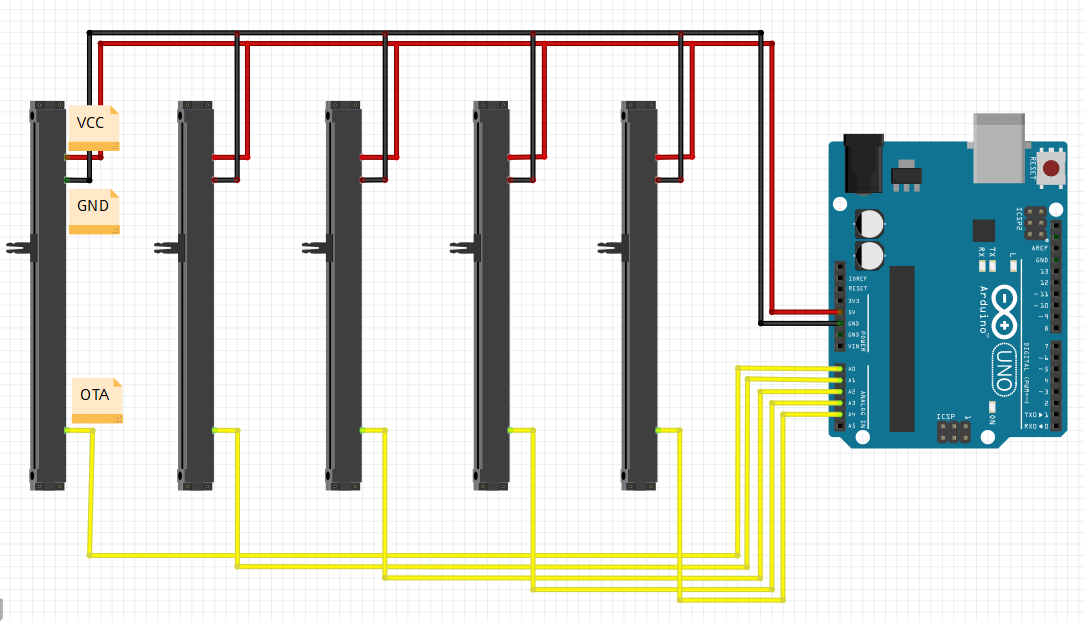
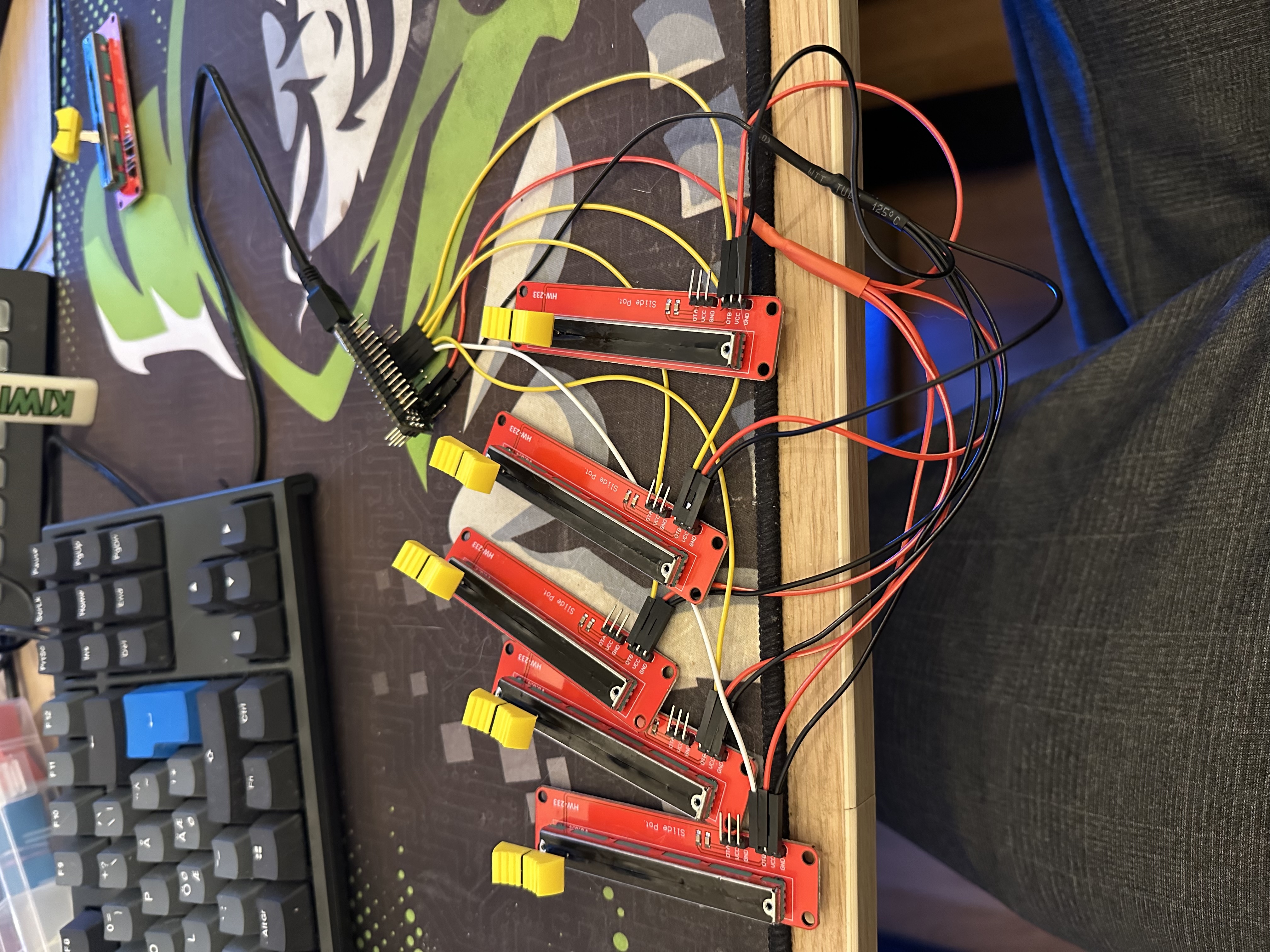
Wire diagram
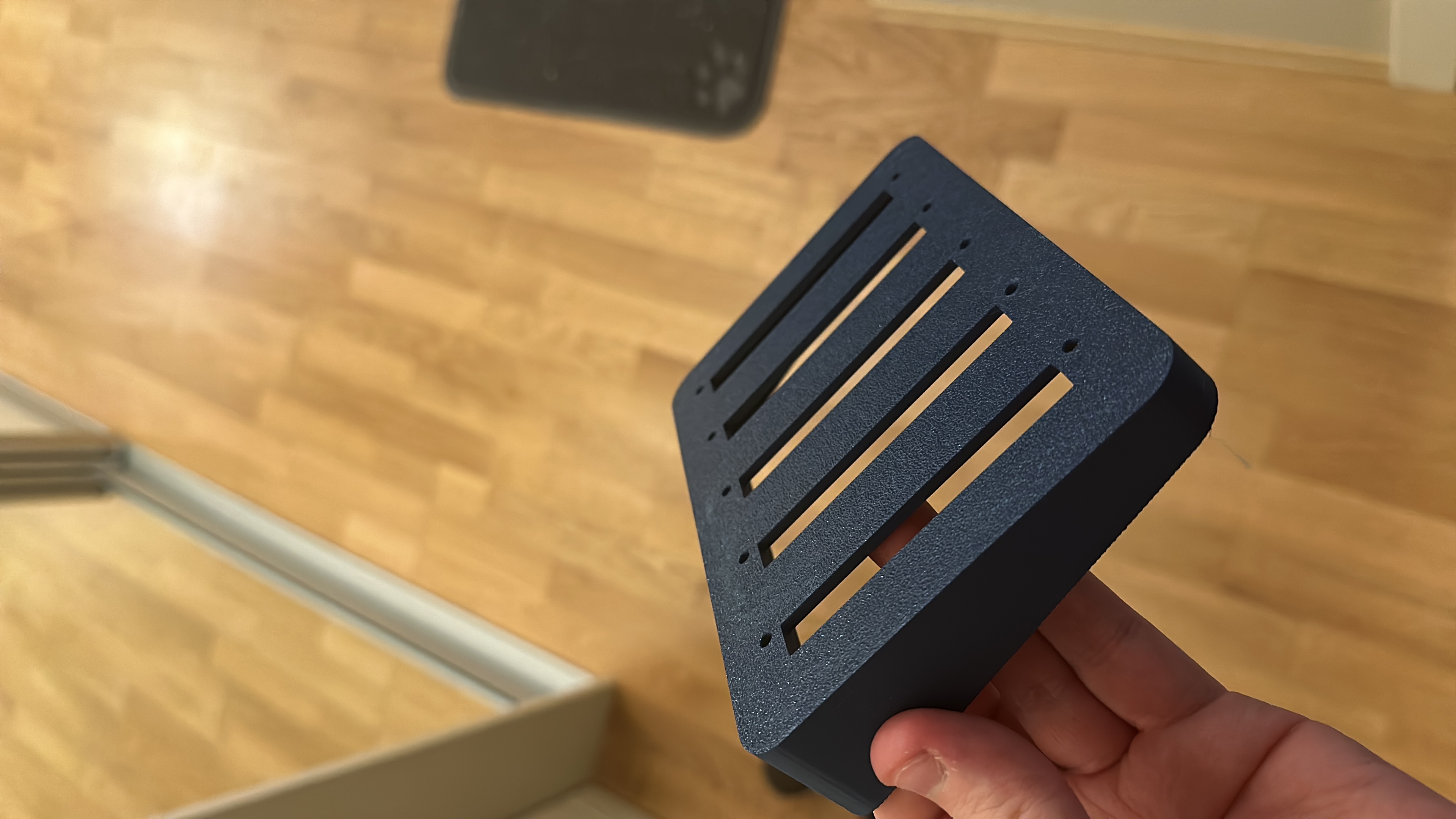
3d Model
3D model I used can be found here
Flash to ESP32
- Connect everything according to the schematic
- Test with a multimeter to be sure your sliders are hooked up correctly
- Flash the Arduino chip with the sketch in
arduino\deej-5-sliders-vanilla- Important: If you have more or less than 5 sliders, you must edit the sketch to match what you have
- After flashing, check the serial monitor. You should see a constant stream of values separated by a pipe (
|) character, e.g.0|240|1023|0|483- When you move a slider, its corresponding value should move between 0 and 1023
Code tour in five stops
PulseAudio control
pulse = pulsectl.Pulse('audio-control')
One handle to rule them all. Through this client we query the default sink for master volume and iterate sink inputs for per app control.
Slider to app mapping
You declare your routing in a simple dictionary. Single apps or lists are both allowed.
slider_mapping = {
    1: "Google Chrome",
    2: "spotify",
    3: [
        "World of Warcraft", "Red Dead Redemption 2", "FMOD Ex App",
        "Civ6", "Stardew Valley", "Factorio: Space Age 2.0.42",
        "Diablo IV", "Gears 5", "Overwatch", "Balatro.exe"
    ],
    4: ["Discord", "WEBRTC VoiceEngine"]
}
Pro tip
- Names must match the
application.nameproperty that PulseAudio reports for each sink input - You can list multiple titles under a single slider to herd whole categories like Games
Asynchronous serial reader
class SerialReaderProtocol(asyncio.Protocol):
    def data_received(self, data):
        self.buffer += data
        while b'\n' in self.buffer:
            line, self.buffer = self.buffer.split(b'\n', 1)
            decoded = line.decode('utf-8').strip()
            self.process_line(decoded)
The protocol buffers bytes until a newline then hands off a full line for parsing. This avoids half frames and keeps the UI snappy.
Mapping fader values to volumes
volumes = [(1023 - value) / 1023 for value in slider_values]
This single list comprehension flips the fader direction and normalizes to 0.0 through 1.0 inclusive. Index 0 drives master. Indexes 1 through 4 drive app groups.
Resilient reconnect loop
while True:
    try:
        transport, protocol = await serial_asyncio.create_serial_connection(
            loop, lambda: SerialReaderProtocol(pulse), '/dev/ttyUSB0', baudrate=9600
        )
        await protocol.connection_lost_future
    except Exception as e:
        print("Error during serial connection:", e)
    await asyncio.sleep(5)
If the USB cable wiggles or the device node changes ownership during a login cycle the script simply sleeps and tries again.
Complete code
!! A UPDATED DEB FILE IS IN THE BOTTOM OF THIS PAGE !!
import asyncio
import serial_asyncio
import pulsectl
from pulsectl import PulseVolumeInfo

# Initialize PulseAudio control
pulse = pulsectl.Pulse('audio-control')

# Mapping of slider indexes to target application names.
# Slider 0 controls the master volume; sliders 1-4 control specific apps.
# For slider 4, you can list multiple applications as a list.
slider_mapping = {
    1: "Google Chrome",
    2: "spotify",
    3: [
        "World of Warcraft",
        "Red Dead Redemption 2",
        "Red Dead Redemption",
        "FMOD Ex App",
        "Civ6",
        "Stardew Valley",
        "Factorio: Space Age 2.0.42",
        "Diablo IV",
        "Gears 5",
        "Overwatch",
        "Balatro.exe",
        "Stardew Valley"
        ],
    4: ["Discord", "WEBRTC VoiceEngine"]
}

class SerialReaderProtocol(asyncio.Protocol):
    def __init__(self, pulse):
        self.pulse = pulse
        self.buffer = b""
        self.last_values = None
        self.connection_lost_future = asyncio.get_running_loop().create_future()

    def connection_made(self, transport):
        self.transport = transport
        print("Serial connection opened. Connected successfully!")

    def data_received(self, data):
        self.buffer += data
        while b'\n' in self.buffer:
            line, self.buffer = self.buffer.split(b'\n', 1)
            try:
                decoded_line = line.decode('utf-8').strip()
            except UnicodeDecodeError as e:
                continue
            self.process_line(decoded_line)

    def process_line(self, line):
        # Expected format: "1023|1023|1023|1023|1023"
        parts = line.split('|')
        if len(parts) != 5:
            return

        try:
            slider_values = [int(val) for val in parts]
        except ValueError:
            return

        # Only process if the slider values have changed
        if self.last_values == slider_values:
            return  # Data hasn't changed; ignore it.
        self.last_values = slider_values

        # Map slider values to volume: 0 -> 1.0 (fader up), 1023 -> 0.0 (fader down)
        volumes = [(1023 - value) / 1023 for value in slider_values]

        # Slider 0 controls master volume
        self.set_master_volume(volumes[0])

        # Sliders 1 to 4 control specific applications.
        for idx in range(1, 5):
            mapping = slider_mapping.get(idx)
            if mapping:
                if isinstance(mapping, list):
                    for app in mapping:
                        self.set_volume_for_app(app, volumes[idx])
                else:
                    self.set_volume_for_app(mapping, volumes[idx])

    def set_master_volume(self, volume):
        default_sink_name = self.pulse.server_info().default_sink_name
        default_sink = next((sink for sink in self.pulse.sink_list()
                             if sink.name == default_sink_name), None)
        if default_sink is not None:
            new_vol = PulseVolumeInfo([volume] * len(default_sink.volume.values))
            self.pulse.volume_set(default_sink, new_vol)

    def set_volume_for_app(self, app_name, volume):
        sink_inputs = self.pulse.sink_input_list()
        found = False
        for sink_input in sink_inputs:
            if sink_input.proplist.get('application.name') == app_name:
                new_vol = PulseVolumeInfo([volume] * len(sink_input.volume.values))
                self.pulse.volume_set(sink_input, new_vol)
                found = True

    def connection_lost(self, exc):
        print("Serial connection lost.")
        if not self.connection_lost_future.done():
            self.connection_lost_future.set_result(True)

async def main():
    loop = asyncio.get_running_loop()
    serial_port = '/dev/ttyUSB0'
    baud_rate = 9600

    while True:
        try:
            # Attempt to create a serial connection.
            print(f"Trying to connect to {serial_port} at {baud_rate} baud...")
            transport, protocol = await serial_asyncio.create_serial_connection(
                loop, lambda: SerialReaderProtocol(pulse), serial_port, baudrate=baud_rate
            )
            # Wait until the protocol signals that the connection was lost.
            await protocol.connection_lost_future
            print("Connection closed. Reconnecting...")
        except Exception as e:
            print("Error during serial connection:", e)
        # Wait before attempting to reconnect.
        await asyncio.sleep(5)

if __name__ == '__main__':
    asyncio.run(main())
Running it locally
Create a virtual environment and install dependencies
python3 -m venv venv
source venv/bin/activate
pip install -r requirements.txt
requirements.txt:
pulsectl
pyserial-asyncio
asyncio
Make sure your user can talk to the serial device
sudo usermod -a -G dialout $USER
newgrp dialout
Start the script
venv/bin/python soundcontrol.py
You should see messages about connecting to the serial port and setting volumes.
Running as a service with systemd
Drop a unit file similar to the following into /etc/systemd/system/soundcontrol.service
[Unit]
Description=ESP32 Sound Control Service
After=network.target

[Service]
Type=simple
User=your_username
WorkingDirectory=/home/your_username/deej-python-linux
ExecStart=/home/your_username/deej-python-linux/venv/bin/python soundcontrol.py
Restart=always
RestartSec=5
Environment=PYTHONUNBUFFERED=1

[Install]
WantedBy=multi-user.target
Reload and start
sudo systemctl daemon-reload
sudo systemctl start soundcontrol.service
sudo systemctl enable soundcontrol.service
Check logs and status
sudo systemctl status soundcontrol.service
journalctl -u soundcontrol.service -f
Troubleshooting playbook
Serial device not found
- Confirm the device path with
dmesg | grep tty - Use
minicom -D /dev/ttyUSB0 -b 9600to confirm the ESP32 is speaking
No apps react to sliders
- List active sink inputs and their names using
pactl list sink-inputs | grep application.name - Verify that the mapping strings match exactly
Master volume does not move
- Ensure a valid default sink exists and is not a dummy output
- Verify audio is routed through PulseAudio and not a paused PipeWire shim
Script has no permission to open the device
- Your user likely is not in group
dialout - Add it and re login or use
newgrpas shown earlier
Notes on PulseAudio and PipeWire
Many modern distributions ship PipeWire as the audio server with PulseAudio compatibility layers. The pulsectl library speaks the Pulse API so it works fine as long as the Pulse compatibility daemon is active. If you do not see real sinks and inputs from pulsectl, check that pipewire-pulse is running.
Security and safety considerations
- The script expects and trusts plaintext from the serial port. Avoid exposing that device to untrusted USB gadgets
- Running as your regular desktop user is recommended to bind to the correct audio session. Running as root can break PulseAudio access
- systemd restarts the service on failure which is handy in practice but can hide a crash loop during development. Watch logs when iterating
Ideas to extend this project
- Add a tiny OLED that shows current app names and levels
- Implement a button per slider that toggles mute with a short press and solo with a long press
- Publish current levels over MQTT for use in Home Assistant dashboards
- Persist mapping in a YAML file and hot reload on change
- Auto detect common games by substring matching and a small registry of aliases
Final thoughts
There is something satisfying about grabbing a physical fader and hearing a game duck neatly under your Discord call while Spotify keeps cruising at a gentle background level. With under one hundred lines of Python and a friendly audio API you get a daily driver workflow upgrade that feels like magic. Plug it in. Slide a fader. Smile.
Acknowledgements
- deej for the original software and work.
- pulsectl for PulseAudio control.
- pyserial-asyncio for asynchronous serial communication.
Download
You can find my latest DEB build for Ubuntu here:
Soundcontrol / Deej-Linux
Things I have added in the DEB version:
- Mapping with config file and auto-reload.
- Case-insensitive prefix matching for application names.
- Wildcard mapping of application names
- Moved service to user-space
- Automated setup with access to
dialoutand service install